Can a Tool Website Get AdSense Approval?
A tool website can be approved, but the tool screen on its own is rarely enough. Google's publisher policies do not allow its ads on screens without publisher content, and a form, a button and a number are closer to an action screen than to content. What tends to make the difference is explanation written in sentences on each tool page. Reference only; approval is decided solely by Google.
You built something useful. It converts, calculates or splits something in two seconds, people actually use it, and then the AdSense reply says "low value content" about a site that does exactly what it promises. So can a tool website get AdSense approval at all? It can, and this page walks through what Google's public rules ask of tool pages. To keep it concrete, I use one real site as the example. SplitWithUs is my own site. I built it partly to test AdPrepare's checks on a real application, and at the time of writing it has not applied yet. One site, not a prediction for yours.
01Calculator website AdSense reviews: why the tool screen is not the content
Google's publisher policies do not allow Google-served ads on screens without publisher content, and they name screens used for alerts, navigation or other behavioral purposes as an example. A calculator screen is mostly labels, input boxes and a result, which is closer to a behavioral screen than to something written for a reader.
The account-level wording points the same way. Google's page on accounts that were not approved describes insufficient content as too little text and asks for complete sentences and paragraphs, not headlines alone. A tool interface is built out of exactly the things that list leaves out.
The direction worth reviewing is simple to state: on each tool page, look for the sentences. If the page reads as a form with a heading, the tool may be working perfectly and the page may still have very little for a review to read.
SourceAds on screens without publisher-content — Google Publisher Policies (official) · Your AdSense account wasn't approved — Google AdSense Help (official)
02Tool website low value content: six things a tool page can explain
Google does not publish a template for tool pages. What follows is a reading of the rules above, turned into a checklist that makes a page read as content rather than as a control panel. Each item is something a person using the tool would want to know anyway.
- What the tool calculates, converts or produces, in one or two plain sentences.
- The rule or formula it uses, and where that rule comes from.
- How to read the result: what the number means and what it does not.
- Its limits: the cases it does not handle and what to use instead.
- A worked example, from input to result to what the result means.
- Links to the related tools and guides on the same site.
03What checking my own tool site turned up
SplitWithUs splits trip expenses paid in several currencies, using the exchange rate of the day each receipt was paid, plus a separate restaurant bill splitter. On the morning of 27 September 2026 it had six URLs in its sitemap, no guides, and no links inside its body text, only in the menu and footer. The methodology page covered four of the six items above; how to read the result and where the rule comes from were missing. No disclaimer was found, and the www address served a second copy of the site instead of redirecting.
The checks came from an internal command-line version of AdPrepare's tool-page check, which is not a product feature; the same six-part checklist runs inside the screener and the audit. Over that day the fixes were ordinary: body links between the tool, the methodology page and the trust pages, a disclaimer section in the terms, four guides, a redirect from www, and the missing sections written out. When the restaurant bill tool was added in the afternoon, the same check flagged the same two gaps on the new page before it was finished.
By 28 September the sitemap listed 12 URLs, the home page had 9 links in its body text, and both tool pages covered all six items. One thing is still open at the time of writing: the four guides explain the rules in their own words but do not name where each rule comes from, and the check reports that as missing on every one of them.
04What a tool check cannot see: whether the tool works
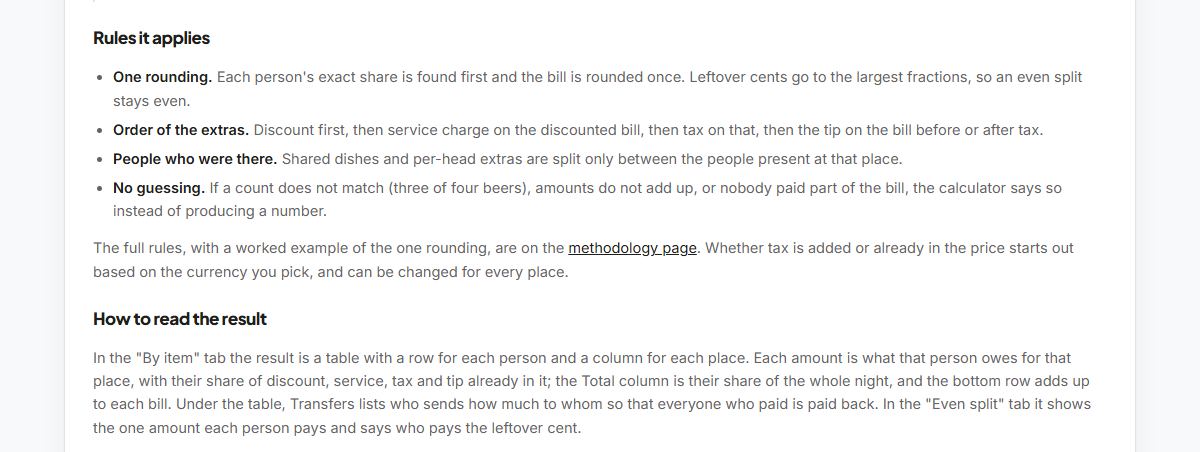
Google's spam policies describe misleading functionality: a site that claims to offer a feature, gives examples such as a PDF merger or a countdown timer, and does not actually deliver it. No crawler-side check can confirm a tool works, including ours, because it reads the page's HTML and does not run the tool's scripts.
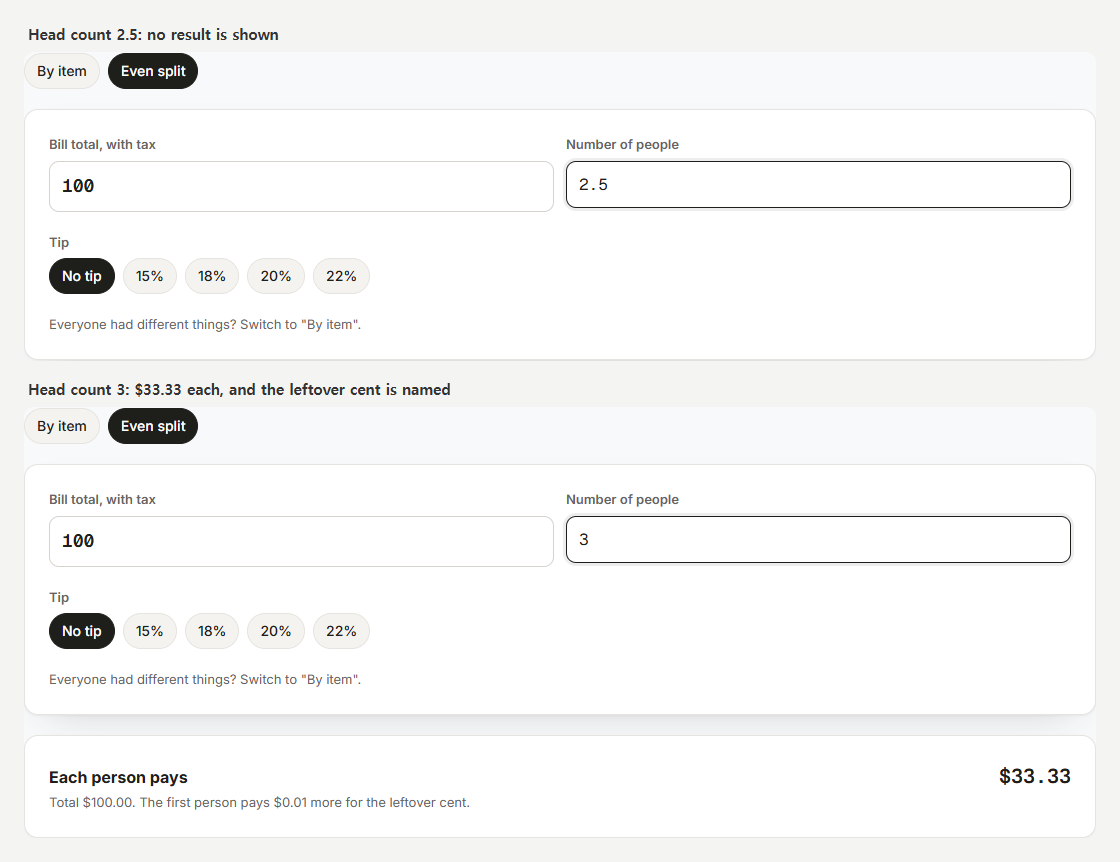
So the tools on SplitWithUs were tested by hand, with ordinary inputs and with edge cases: no people, one person, a missing date, an amount of zero, a date in the future. Most of the edge cases were handled properly by the tool, which showed a plain message instead of a result. One was not: the even split on the restaurant tool showed "Each person pays $100.00" when the head count was blank, 0, 2.5 or 51. After the fix it shows no result until the head count is valid.
The direction here is to spend ten minutes trying to break your own tool before a reviewer does. Try the empty input, the zero, the decimal where a whole number belongs, and the number that is far too large, and read what the page says back.
SourceSpam policies for Google web search — Google Search Central (official)
05The mistake we see most often
The most common advice for tool sites in forum threads and guides is a number: publish 8 to 15 articles, or write 800 to 1,200 words per page, and then apply. Google's AdSense documentation does not set a minimum number of pages, posts or words; the requirements it describes are about content, originality and navigation.
Chasing a number tends to produce the wrong pages. The shortcut that looks cheapest on a tool site is a page for every variation, such as one converter per currency pair or one calculator per city. Google's spam policies call many pages made mainly to rank, with little value for the reader, scaled content abuse. SplitWithUs considered a page per currency pair and dropped the idea for that reason.
The better measure is whether each page has something only it can say. On a tool site that is usually the tool's own rules, examples and limits, which is the list above.
SourceMake sure your site's pages are ready for AdSense — Google AdSense Help (official)
06Quick reference before you apply
- Every tool page explains, in sentences, what it does, its rule and source, how to read the result, its limits, and one worked example.
- That explanation is in the page's HTML when it first loads, not only after a script runs.
- Tools behave sensibly on empty, zero, decimal and oversized inputs.
- There are no near-identical pages made by swapping one word, such as a city or a currency.
- Menus and body text lead from each tool to its guides and back.
- About, Contact, Privacy (with the advertising cookie disclosure) and Terms are reachable from every page.
Frequently asked questions
QCan a single page tool site get AdSense approval?
It tends to be difficult. Google's review looks at the site as a whole, including navigation and whether there are complete pages to read, and a single tool screen offers little of either. Several related tools with written explanations, supporting guides and the required pages give a review more to assess.
QHow much tool page content for AdSense is enough?
Google does not publish a word count or a page count. A more useful test is whether the page explains what the tool does, the rule behind it, how to read the result, its limits and one worked example, in full sentences a person would actually read.
QDo I need blog posts on a calculator website?
Not as a quota, but supporting guides often help, because they are where the topic around the tool gets explained. Guides that answer questions your users actually have tend to do more than guides written to reach a number.
QDid SplitWithUs get approved?
It had not applied when this was written. What happens next will be published whether the site is approved or not, with the checks run and the changes made along the way.
See which of these signals your site shows
AdPrepare checks your site against Google's publicly available AdSense guidelines and highlights common risk signals — in seconds, free to start. Results are reference estimates; approval is decided solely by Google.
Start a free scan →AdPrepare is an independent tool and is not affiliated with, sponsored by, or endorsed by Google LLC. "Google" and "AdSense" are trademarks of Google LLC. The information here is based on Google's publicly available guidelines and is provided as reference only; it is not a guarantee of AdSense approval, traffic, or earnings, and it is not legal or professional advice. Last updated: 2026-09-29.